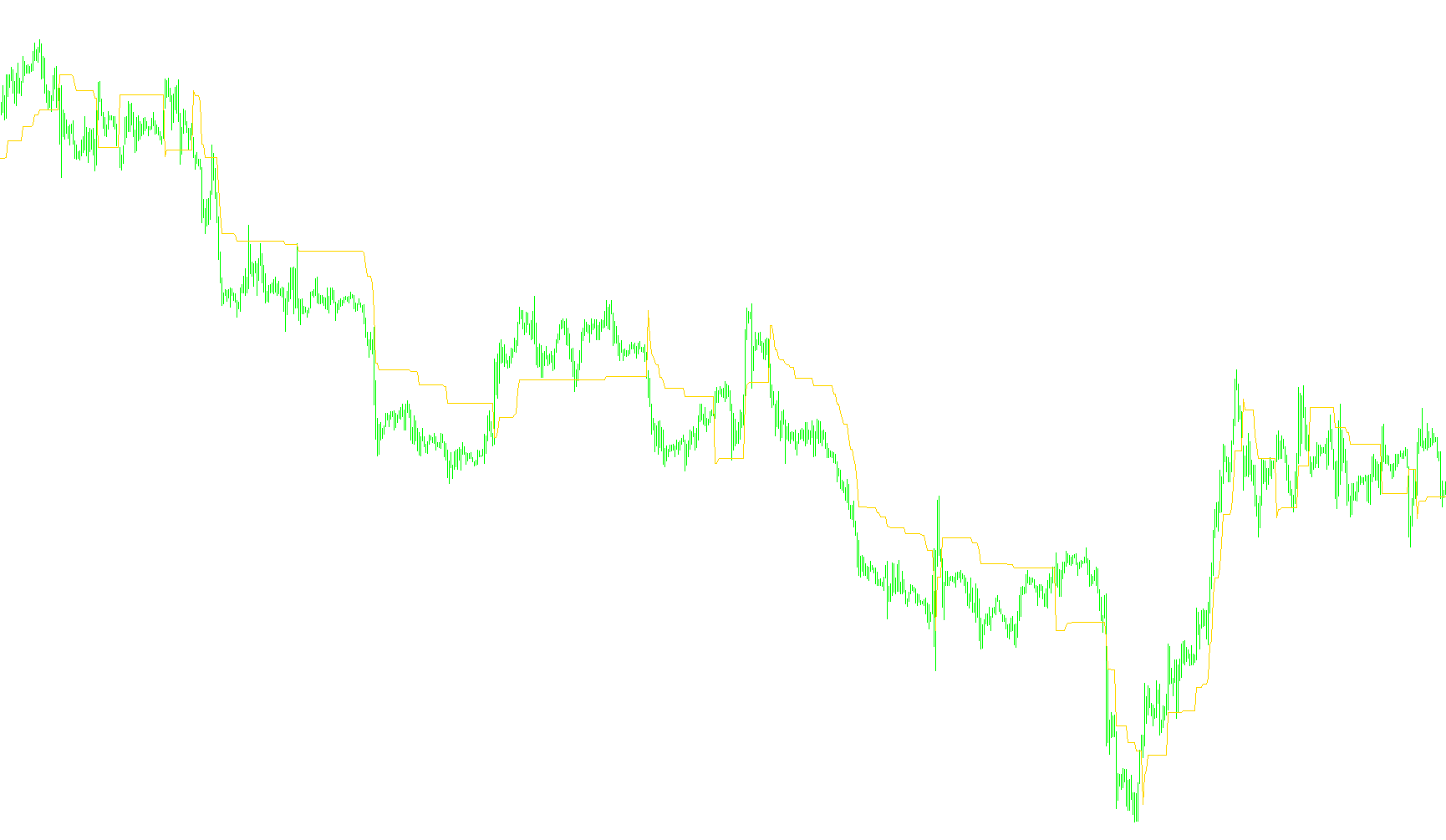
Overview
The delta-stop script is a technical analysis tool designed to help traders visualize dynamic price levels on a trading chart. Its primary purpose is to establish a "trailing" boundary that adjusts based on recent market volatility, helping users identify potential areas where the current trend might reverse or where a stop-loss should be placed.
How the Logic Works
The script operates using two distinct modes to determine how it calculates these boundaries:
1. Automatic Mode (Volatility-Based)
In this mode, the tool automatically adjusts its sensitivity based on how "choppy" or smooth the market is at any given moment. It does this by analyzing a large historical window of price data to calculate the Average True Range (ATR)—a common metric used to measure market volatility.
- The script takes the average volatility and applies a specific multiplier (ratio) to it.
- This ensures that during periods of high price swings, the boundary expands to give the trade more "breathing room," while during quiet markets, the boundary tightens to stay closer to the current price.
2. Manual Mode (Fixed Distance)
In this mode, the script ignores market volatility and follows a strict, user-defined distance. If you set a specific value, the boundary will always remain at that exact distance from the price movement, regardless of whether the market is moving fast or slow.
The Core Mechanics
Regardless of the mode selected, the logic follows a specific set of rules to draw the line on your chart:
- Trend Tracking: The script looks at the relationship between the current price and the previous level of the boundary. It seeks to "follow" the price in the direction of the trend.
- Smart Adjustments:
- If the price moves in favor of the trend, the boundary stays put or adjusts slightly to lock in potential gains.
- If the price pulls back against the trend (a retracement), the script calculates the minimum distance required to maintain a safety buffer.
- Dynamic Updates: The line is updated with every new price tick. If a significant move occurs that breaks the established logic, the boundary recalibrates instantly to account for the new price position plus the calculated "Delta" (the buffer zone).
Summary for the User
Essentially, this tool acts as a smart "safety net." Instead of a flat, static line, it creates a reactive boundary that breathes with the market. By using either automated volatility math or your own manual preferences, it helps you visualize where a trend is still healthy and where it might be exhausted, allowing for more disciplined entries and exits.
//+------------------------------------------------------------------+
//|                                                   delta-stop.mq4 |
//|                Copyright © 2006, Nick Bilak, beluck[AT]gmail.com |
//+------------------------------------------------------------------+
#property copyright "Copyright c 2006, Nick Bilak"
#property link      "http://www.mql4.info/"

#property indicator_chart_window
#property indicator_buffers 1
#property indicator_color1 Red
//---- input parameters
extern int     Mode=0; //0 - auto, 1 - manual
extern double  DeltaPrice=50;
extern int     ATRperiod=500;
extern double  ATRratio=3.522;
double buf[];
double atr[];
double atrs[];

int init()  {
   IndicatorBuffers(3);
   SetIndexStyle(0,DRAW_LINE);
   SetIndexBuffer(0,buf);
   SetIndexEmptyValue(1,0);
   SetIndexBuffer(1,atr);
   SetIndexBuffer(2,atrs);
   SetIndexEmptyValue(2,0);
   return(0);
}
int start() {


   int counted_bars=IndicatorCounted();
   int shift,limit,i,k;
   double TrStopLevel,DeltaStop;

   if (counted_bars<0) return(-1);
   if (counted_bars>0) counted_bars--;
   limit=Bars-ATRperiod*2-1;
   //if(counted_bars>=ATRperiod) limit=Bars-counted_bars-1;

   if (Mode==0) {
      for (i=limit+ATRperiod+1;i>=0;i--) {
         atr[i]=iATR(NULL,0,ATRperiod,i);
      }
      for (i=limit;i>=0;i--) {
         atrs[i]=iMAOnArray(atr,0,ATRperiod,0,MODE_SMMA,i);
      }
   }
   else DeltaStop=DeltaPrice;

   for (shift=limit;shift>=0;shift--)   {
      if (Mode==0) DeltaStop=atrs[shift] * ATRratio; else DeltaStop=DeltaPrice*Point;
      if (Close[shift]==buf[shift+1]) buf[shift] = buf[shift+1];
      else if (Close[shift+1]<=buf[shift+1] && Close[shift]<buf[shift+1]) buf[shift]=MathMin(buf[shift+1],Close[shift]+DeltaStop);
      else if (Close[shift+1]>=buf[shift+1] && Close[shift]>buf[shift+1]) buf[shift]=MathMax(buf[shift+1],Close[shift]-DeltaStop);
      else if (Close[shift]>buf[shift+1]) buf[shift]=Close[shift]-DeltaStop;
      else buf[shift]=Close[shift]+DeltaStop;
   }
   return(0);
}
Comments