EMA_Cross-over__Alerts
Download script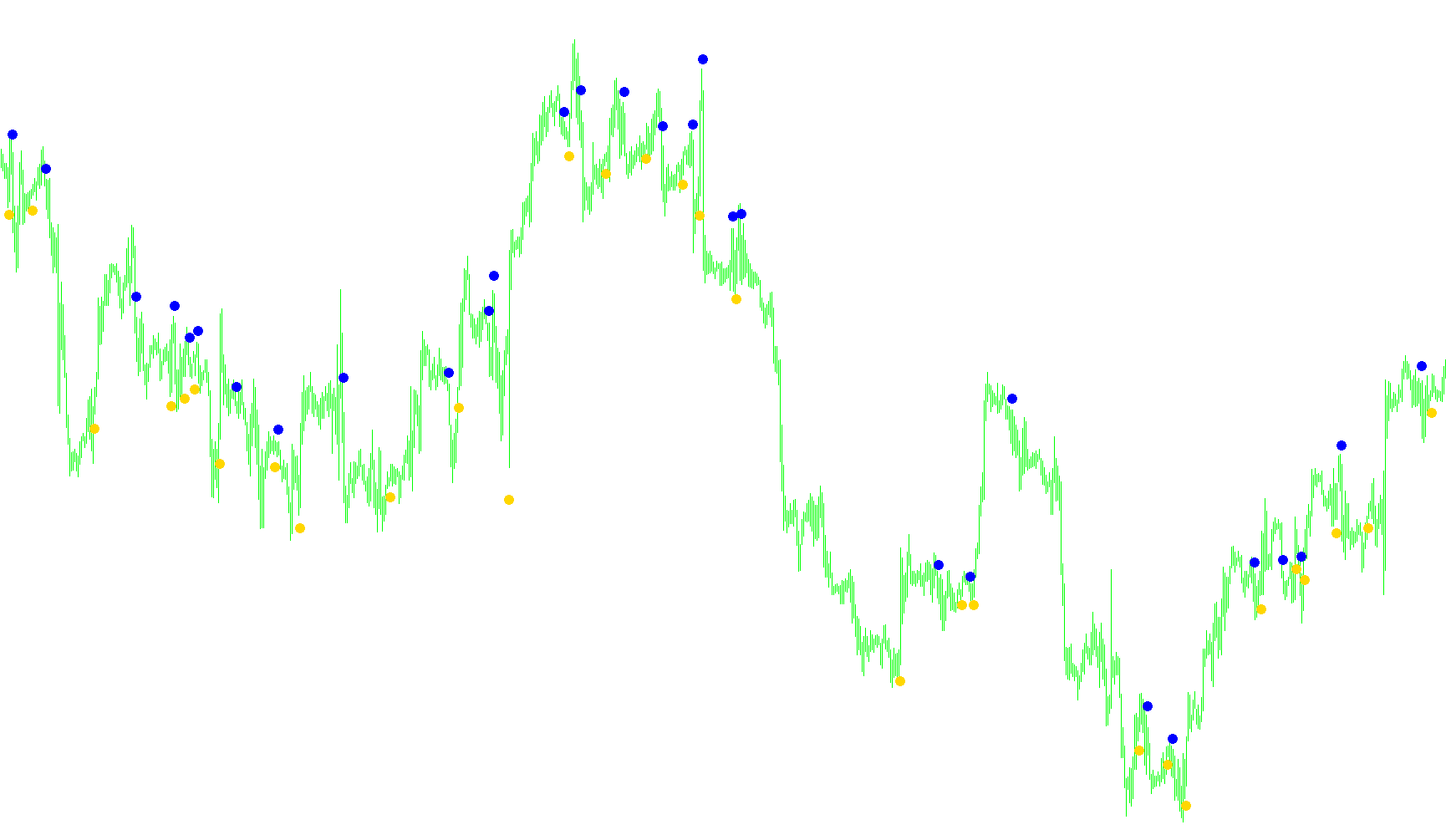
This tool is designed to help traders identify specific "crossover" moments between two Exponential Moving Averages (EMAs) on a trading chart. While moving averages are often visible as lines, they can sometimes become cluttered or difficult to read when looking at short timeframes or zoomed-out views. This script solves that problem by placing clear visual markers exactly where the trend shifts occur.
How It Works
The logic focuses on two different moving averages: a "Faster" one and a "Slower" one. By comparing these two, the script identifies the exact moment when the faster line moves from below to above (a potential upward signal) or from above to below (a potential downward signal).
To ensure accuracy and prevent "fake" signals, the logic performs a three-point check:
- It looks at the current position of both averages.
- It looks back at where they were in the previous candle.
- It checks the position immediately following the crossover.
If all three conditions confirm a definitive cross, the script places an arrow on your chart to highlight the entry point.
Key Features
- Visual Markers: Instead of just looking for lines to touch, the script automatically plots arrows at the high or low of the price candle, making it much easier to spot trend changes at a glance.
- Dynamic Spacing: The markers are intelligently placed so they don't overlap with the actual price candles; the script calculates the average range of recent price movement to ensure the arrows sit at a clean distance from the bars.
- Customizable Alerts: You can choose how you want to be notified when a crossover occurs. The logic supports three different notification types:
- On-Screen Alerts: A pop-up message on your trading platform.
- Audio Notifications: A sound file that plays to grab your attention.
- Email Alerts: A direct notification sent to your registered email address.
- Smart Filtering: The script includes a "Current Trend" check. This helps prevent the system from sending multiple repetitive alerts for the same move, ensuring you only get notified when a new trend actually begins.
User Experience
This tool is built for clarity. It allows you to remove the bulky EMA lines from your chart entirely if you prefer a cleaner workspace, while still receiving the precise visual and audio cues needed to track market momentum. You can easily adjust the speed of the EMAs in the settings to match your specific trading strategy.
//+------------------------------------------------------------------+
//|                                         EMA-Crossover_Signal.mq4 |
//|                         |
//+------------------------------------------------------------------+

/*
  +------------------------------------------------------------------+
  | Allows you to enter two ema periods and it will then show you at |
  | Which point they crossed over. It is more usful on the shorter   |
  | periods that get obscured by the bars / candlesticks and when    |
  | the zoom level is out. Also allows you then to remove the emas   |
  | from the chart.
  +------------------------------------------------------------------+
*/

#property indicator_chart_window
#property indicator_buffers 2
#property indicator_color1 Yellow
#property indicator_color2 Red

double CrossUp[];
double CrossDown[];
int CurrentTrend = 0;
int starttime = 0;
extern int FasterEMA = 5;
extern int SlowerEMA = 13;
extern int Show_Alert = 1;
extern int Play_Sound = 1;
extern int Send_Mail = 0;
extern string SoundFilename = "alert.wav";


int init()
  {
   SetIndexStyle(0, DRAW_ARROW, EMPTY,2);
   SetIndexArrow(0, 108);
   SetIndexBuffer(0, CrossUp);
   SetIndexStyle(1, DRAW_ARROW, EMPTY,2);
   SetIndexArrow(1, 108);
   SetIndexBuffer(1, CrossDown);
   starttime = TimeLocal();

   return(0);
  }


int deinit()
  {
   return(0);
  }


int start() {
   int limit, i, counter, loop;
   double fasterEMAnow, slowerEMAnow, fasterEMAprevious, slowerEMAprevious, fasterEMAafter, slowerEMAafter;
   double Range, AvgRange;
   int counted_bars=IndicatorCounted();

   //---- check for possible errors
   if(counted_bars<0) return(-1);

   //---- last counted bar will be recounted
   if(counted_bars>0) counted_bars--;

   limit=Bars-counted_bars;

   loop = 0;
   for(i = 0; i <= limit; i++) {
      counter=i;
      Range=0;
      AvgRange=0;
      for (counter=i ;counter<=i+9;counter++)
      {
         AvgRange=AvgRange+MathAbs(High[counter]-Low[counter]);
      }
      Range=AvgRange/10;

      fasterEMAnow = iMA(NULL, 0, FasterEMA, 0, MODE_EMA, PRICE_CLOSE, i);
      fasterEMAprevious = iMA(NULL, 0, FasterEMA, 0, MODE_EMA, PRICE_CLOSE, i+1);
      fasterEMAafter = iMA(NULL, 0, FasterEMA, 0, MODE_EMA, PRICE_CLOSE, i-1);

      slowerEMAnow = iMA(NULL, 0, SlowerEMA, 0, MODE_EMA, PRICE_CLOSE, i);
      slowerEMAprevious = iMA(NULL, 0, SlowerEMA, 0, MODE_EMA, PRICE_CLOSE, i+1);
      slowerEMAafter = iMA(NULL, 0, SlowerEMA, 0, MODE_EMA, PRICE_CLOSE, i-1);

      if ((fasterEMAnow > slowerEMAnow) && (fasterEMAprevious < slowerEMAprevious) && (fasterEMAafter > slowerEMAafter)) {
         CrossUp[i] = Low[i] - Range*0.5;

         if ((loop == 0) && (CurrentTrend != 1) && (TimeLocal() - starttime >= 10))  {
            if (Show_Alert == 1)  {
               Alert("Cross Up on " + Symbol() + " " + Period() + "min " + FasterEMA + "/" + SlowerEMA + " EMA");
               }
            if (Play_Sound == 1)  {
               PlaySound(SoundFilename);
               }
            if (Send_Mail == 1)  {
               SendMail("Cross Up on " + Symbol() + " " + Period() + "min " + FasterEMA + "/" + SlowerEMA + " EMA", "");
               }

            CurrentTrend = 1;
            }

         if (loop == 0)  {
            loop = 1;
            }
      }
      else if ((fasterEMAnow < slowerEMAnow) && (fasterEMAprevious > slowerEMAprevious) && (fasterEMAafter < slowerEMAafter)) {
         CrossDown[i] = High[i] + Range*0.5;

         if ((loop == 0) && (CurrentTrend != -1) && (TimeLocal() - starttime >= 10))  {
            if (Show_Alert == 1)  {
               Alert("Cross Down on " + Symbol() + " " + Period() + "min " + FasterEMA + "/" + SlowerEMA + " EMA");
               }
            if (Play_Sound == 1)  {
               PlaySound(SoundFilename);
               }
            if (Send_Mail == 1)  {
               SendMail("Cross Down on " + Symbol() + " " + Period() + "min " + FasterEMA + "/" + SlowerEMA + " EMA", "");
               }

            CurrentTrend = -1;
            }

         if (loop == 0)  {
            loop = 1;
            }
       }
   }
   return(0);
}
Comments