MA_Crossover_Signal_sound
Download script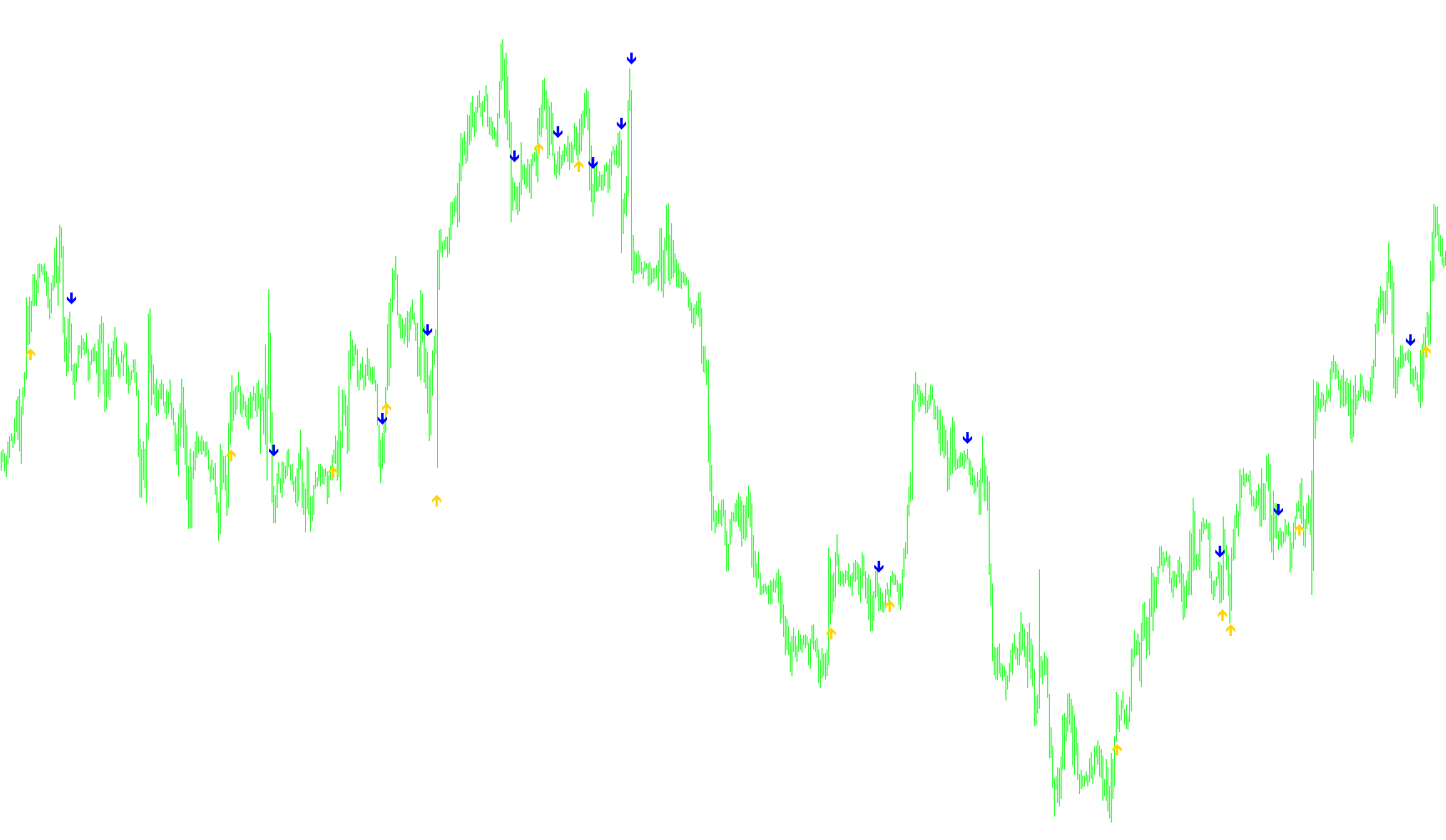
This script is designed as a visual aid for traders to identify specific momentum shifts in the market by detecting when two moving averages intersect. Instead of forcing you to constantly monitor overlapping lines on your chart—which can sometimes become difficult to see when zoomed out or crowded with price bars—this tool automatically identifies those "cross-over" moments and marks them clearly on your screen.
How the Logic Works
The core functionality of the script relies on tracking two different moving averages simultaneously: a "Faster" average and a "Slower" average. These represent different speeds of market trends (for example, one might track very recent price action while the other tracks a broader trend).
The script constantly analyzes the relationship between these two lines across every historical bar on your chart to find three specific conditions:
- Upward Crossovers: The script looks for the exact moment the Faster moving average climbs above the Slower moving average. When this shift happens, the tool places a visual marker below the price candle to signal a potential bullish move.
- Downward Crossovers: Conversely, it identifies the moments when the Faster moving average drops below the Slower moving average. In these instances, it places a visual marker above the price candle to signal a potential bearish move.
- Precise Timing: To ensure accuracy and filter out "noise," the logic verifies the crossover by checking the current position of the averages against their previous positions. It confirms that the lines have actually switched sides rather than just moving closer to each other.
Key Features for the User
- Dynamic Positioning: The script calculates the average range of recent price fluctuations. It uses this data to place its visual markers at a consistent distance from the candles, ensuring they are always visible and don't overlap with the actual price bars.
- Audio Alerts: To ensure you don't miss a significant trend shift while away from your monitor, the script includes an automated sound notification that triggers whenever a new crossover occurs in real-time.
- Customizable Parameters: While it provides default settings for the moving averages (such as the period lengths and the type of average used), these can be adjusted to suit different trading styles, whether you prefer fast-paced scalping signals or slower, more stable trend movements.
By using this tool, you can effectively "clean up" your chart by removing the moving average lines entirely while still benefiting from the visual alerts they provide, allowing for a clearer view of price action without sacrificing important technical data.
//+------------------------------------------------------------------+
//|                                         EMA-Crossover_Signal.mq4 |
//|         Copyright © 2005, Jason Robinson (jnrtrading)            |
//|                   http://www.jnrtading.co.uk                     |
//+------------------------------------------------------------------+

/*
  +------------------------------------------------------------------+
  | Allows you to enter two ema periods and it will then show you at |
  | Which point they crossed over. It is more usful on the shorter   |
  | periods that get obscured by the bars / candlesticks and when    |
  | the zoom level is out. Also allows you then to remove the emas   |
  | from the chart. (emas are initially set at 5 and 6)              |
  +------------------------------------------------------------------+
*/
#property copyright "Copyright © 2005, Jason Robinson (jnrtrading)"
#property link      "http://www.jnrtrading.co.uk"

#property indicator_chart_window
#property indicator_buffers 2
#property indicator_color1 DodgerBlue
#property indicator_color2 Red

double CrossUp[];
double CrossDown[];
extern int FasterMode = 1; //0=sma, 1=ema, 2=smma, 3=lwma
extern int FasterMA =   13;
extern int SlowerMode = 1; //0=sma, 1=ema, 2=smma, 3=lwma
extern int SlowerMA =   25;
//+------------------------------------------------------------------+
//| Custom indicator initialization function                         |
//+------------------------------------------------------------------+
int init()
  {
//---- indicators
   SetIndexStyle(0, DRAW_ARROW, EMPTY);
   SetIndexArrow(0, 233);
   SetIndexBuffer(0, CrossUp);
   SetIndexStyle(1, DRAW_ARROW, EMPTY);
   SetIndexArrow(1, 234);
   SetIndexBuffer(1, CrossDown);
//----
   return(0);
  }
//+------------------------------------------------------------------+
//| Custom indicator deinitialization function                       |
//+------------------------------------------------------------------+
int deinit()
  {
//----

//----
   return(0);
  }
//+------------------------------------------------------------------+
//| Custom indicator iteration function                              |
//+------------------------------------------------------------------+
int start() {
   int limit, i, counter;
   double fasterMAnow, slowerMAnow, fasterMAprevious, slowerMAprevious, fasterMAafter, slowerMAafter;
   double Range, AvgRange;
   int counted_bars=IndicatorCounted();
//---- check for possible errors
   if(counted_bars<0) return(-1);
//---- last counted bar will be recounted
   if(counted_bars>0) counted_bars--;

   limit=Bars-counted_bars;

   for(i = 0; i <= limit; i++) {

      counter=i;
      Range=0;
      AvgRange=0;
      for (counter=i ;counter<=i+9;counter++)
      {
         AvgRange=AvgRange+MathAbs(High[counter]-Low[counter]);
      }
      Range=AvgRange/10;

      fasterMAnow = iMA(NULL, 0, FasterMA, 0, FasterMode, PRICE_CLOSE, i);
      fasterMAprevious = iMA(NULL, 0, FasterMA, 0, FasterMode, PRICE_CLOSE, i+1);
      fasterMAafter = iMA(NULL, 0, FasterMA, 0, FasterMode, PRICE_CLOSE, i-1);

      slowerMAnow = iMA(NULL, 0, SlowerMA, 0, SlowerMode, PRICE_CLOSE, i);
      slowerMAprevious = iMA(NULL, 0, SlowerMA, 0, SlowerMode, PRICE_CLOSE, i+1);
      slowerMAafter = iMA(NULL, 0, SlowerMA, 0, SlowerMode, PRICE_CLOSE, i-1);

      if ((fasterMAnow > slowerMAnow) && (fasterMAprevious < slowerMAprevious) && (fasterMAafter > slowerMAafter)) {
         CrossUp[i] = Low[i] - Range*0.5; if (i<=2) PlaySound("expert.wav");
      }
      else if ((fasterMAnow < slowerMAnow) && (fasterMAprevious > slowerMAprevious) && (fasterMAafter < slowerMAafter)) {
         CrossDown[i] = High[i] + Range*0.5; if (i<=2) PlaySound("expert.wav");
      }
   }
   return(0);
}
Comments