MA_Crossover_Signal3_v2
Download script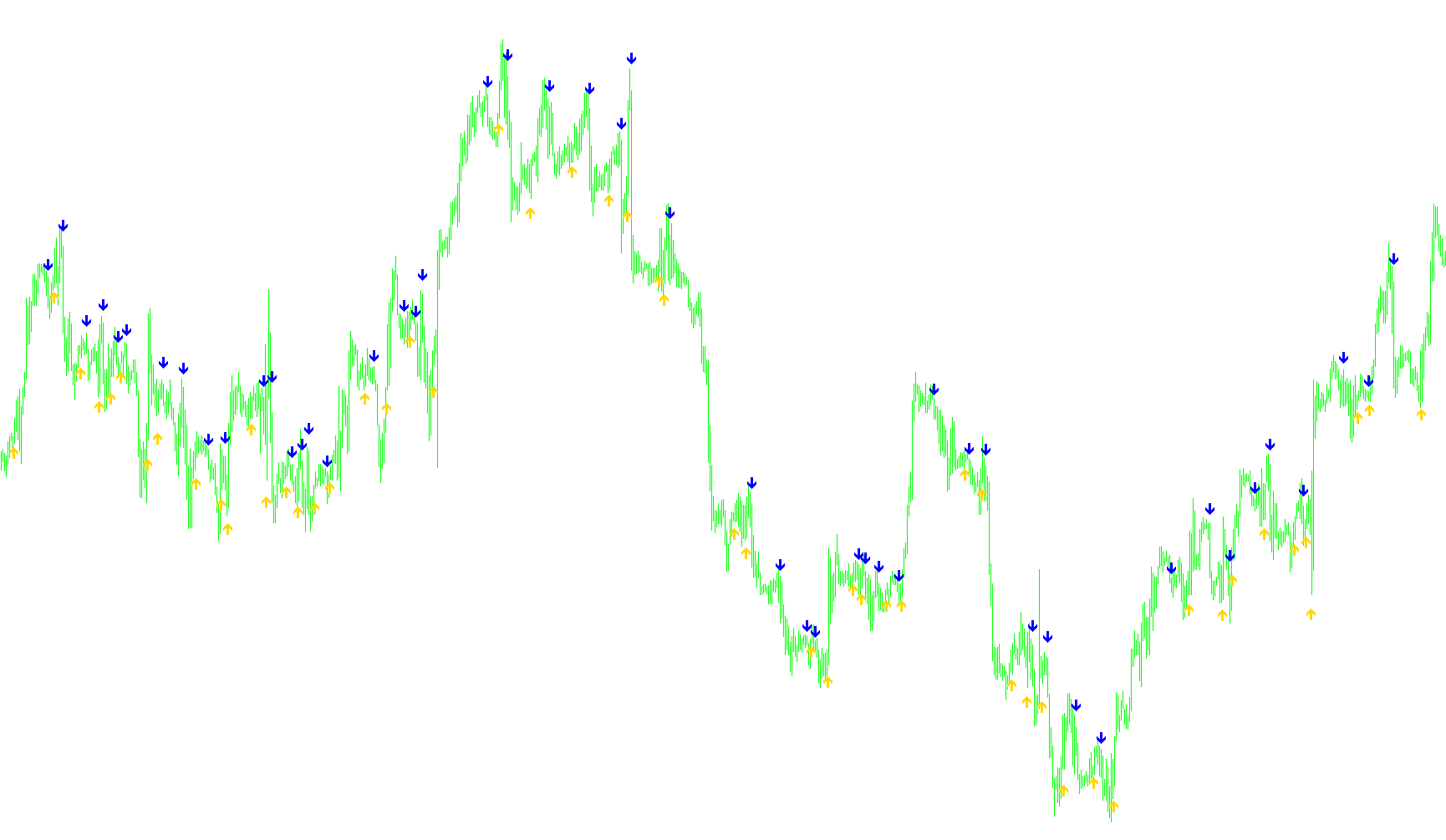
This tool is designed to help traders identify specific momentum shifts in the market by highlighting "crossovers" between two different moving averages. While many traders use moving averages as lines on a chart, this script focuses on the exact moments these lines intersect, making it easier to spot potential entry or exit points without getting distracted by visual clutter.
How it Works
The logic relies on comparing a "Fast" moving average against a "Slow" moving average. In trading, a faster average reacts more quickly to recent price changes, while a slower one represents the broader trend.
The script constantly monitors the relationship between these two averages:
- Bullish Signal: When the Fast average moves from below the Slow average to above it, the script identifies an upward momentum shift.
- Bearish Signal: When the Fast average drops from above the Slow average to below it, the script identifies a downward momentum shift.
Visual Execution
Instead of drawing continuous lines that might clutter your screen, this script places clear visual markers (arrows) directly on your chart at the precise point where these crossovers occur:
- Upward Signals: Placed slightly below the candle's low to indicate a potential "buy" or "long" opportunity.
- Downward Signals: Placed slightly above the candle's high to indicate a potential "sell" or "short" opportunity.
Key Features for the User
- Customizable Sensitivity: You can adjust the length of both the Fast and Slow averages (for example, using very short periods like 5 and 6) to make the signals more reactive to immediate price action.
- Type Selection: The logic allows for different types of moving averages (such as Simple, Exponential, Smooth, or Linear Weighted), giving you the flexibility to choose the "smoothness" of the data you are analyzing.
- Dynamic Positioning: The script calculates the average range of recent price candles to ensure that the signal arrows are placed at a consistent and visible distance from the price, regardless of how volatile the market is at that moment.
/*-----------------------------+
|			       |
| Shared by www.Aptrafx.com    |
|			       |
+------------------------------*/

//+------------------------------------------------------------------+
//|                                         EMA-Crossover_Signal.mq4 |
//|         Copyright © 2005, Jason Robinson (jnrtrading)            |
//|                   http://www.jnrtading.co.uk                     |
//+------------------------------------------------------------------+

/*
  +------------------------------------------------------------------+
  | Allows you to enter two ema periods and it will then show you at |
  | Which point they crossed over. It is more usful on the shorter   |
  | periods that get obscured by the bars / candlesticks and when    |
  | the zoom level is out. Also allows you then to remove the emas   |
  | from the chart. (emas are initially set at 5 and 6)              |
  +------------------------------------------------------------------+
*/
#property copyright "Copyright © 2005, Jason Robinson (jnrtrading)"
#property link      "http://www.jnrtrading.co.uk"

#property indicator_chart_window
#property indicator_buffers 2
#property indicator_color1 LawnGreen
#property indicator_color2 Red

double CrossUp[];
double CrossDown[];
extern int FasterMode = 1; //0=sma, 1=ema, 2=smma, 3=lwma
extern int FasterMA =   5;
extern int SlowerMode = 1; //0=sma, 1=ema, 2=smma, 3=lwma
extern int SlowerMA =   6;
//+------------------------------------------------------------------+
//| Custom indicator initialization function                         |
//+------------------------------------------------------------------+
int init()
  {
//---- indicators
   SetIndexStyle(0, DRAW_ARROW, EMPTY);
   SetIndexArrow(0, 233);
   SetIndexBuffer(0, CrossUp);
   SetIndexStyle(1, DRAW_ARROW, EMPTY);
   SetIndexArrow(1, 234);
   SetIndexBuffer(1, CrossDown);
//----
   return(0);
  }
//+------------------------------------------------------------------+
//| Custom indicator deinitialization function                       |
//+------------------------------------------------------------------+
int deinit()
  {
//----

//----
   return(0);
  }
//+------------------------------------------------------------------+
//| Custom indicator iteration function                              |
//+------------------------------------------------------------------+
int start() {
   int limit, i, counter;
   double fasterMAnow, slowerMAnow, fasterMAprevious, slowerMAprevious, fasterMAafter, slowerMAafter;
   double Range, AvgRange;
   int counted_bars=IndicatorCounted();
//---- check for possible errors
   if(counted_bars<0) return(-1);
//---- last counted bar will be recounted
   if(counted_bars>0) counted_bars--;

   limit=Bars-counted_bars;

   for(i = 0; i <= limit; i++) {

      counter=i;
      Range=0;
      AvgRange=0;
      for (counter=i ;counter<=i+9;counter++)
      {
         AvgRange=AvgRange+MathAbs(High[counter]-Low[counter]);
      }
      Range=AvgRange/10;

      fasterMAnow = iMA(NULL, 0, FasterMA, 0, FasterMode, PRICE_CLOSE, i);
      fasterMAprevious = iMA(NULL, 0, FasterMA, 0, FasterMode, PRICE_CLOSE, i+1);
      fasterMAafter = iMA(NULL, 0, FasterMA, 0, FasterMode, PRICE_CLOSE, i-1);

      slowerMAnow = iMA(NULL, 0, SlowerMA, 0, SlowerMode, PRICE_CLOSE, i);
      slowerMAprevious = iMA(NULL, 0, SlowerMA, 0, SlowerMode, PRICE_CLOSE, i+1);
      slowerMAafter = iMA(NULL, 0, SlowerMA, 0, SlowerMode, PRICE_CLOSE, i-1);

      if ((fasterMAnow > slowerMAnow) && (fasterMAprevious < slowerMAprevious) && (fasterMAafter > slowerMAafter)) {
         CrossUp[i] = Low[i] - Range*0.5;
      }
      else if ((fasterMAnow < slowerMAnow) && (fasterMAprevious > slowerMAprevious) && (fasterMAafter < slowerMAafter)) {
         CrossDown[i] = High[i] + Range*0.5;
      }
   }
   return(0);
}
Comments