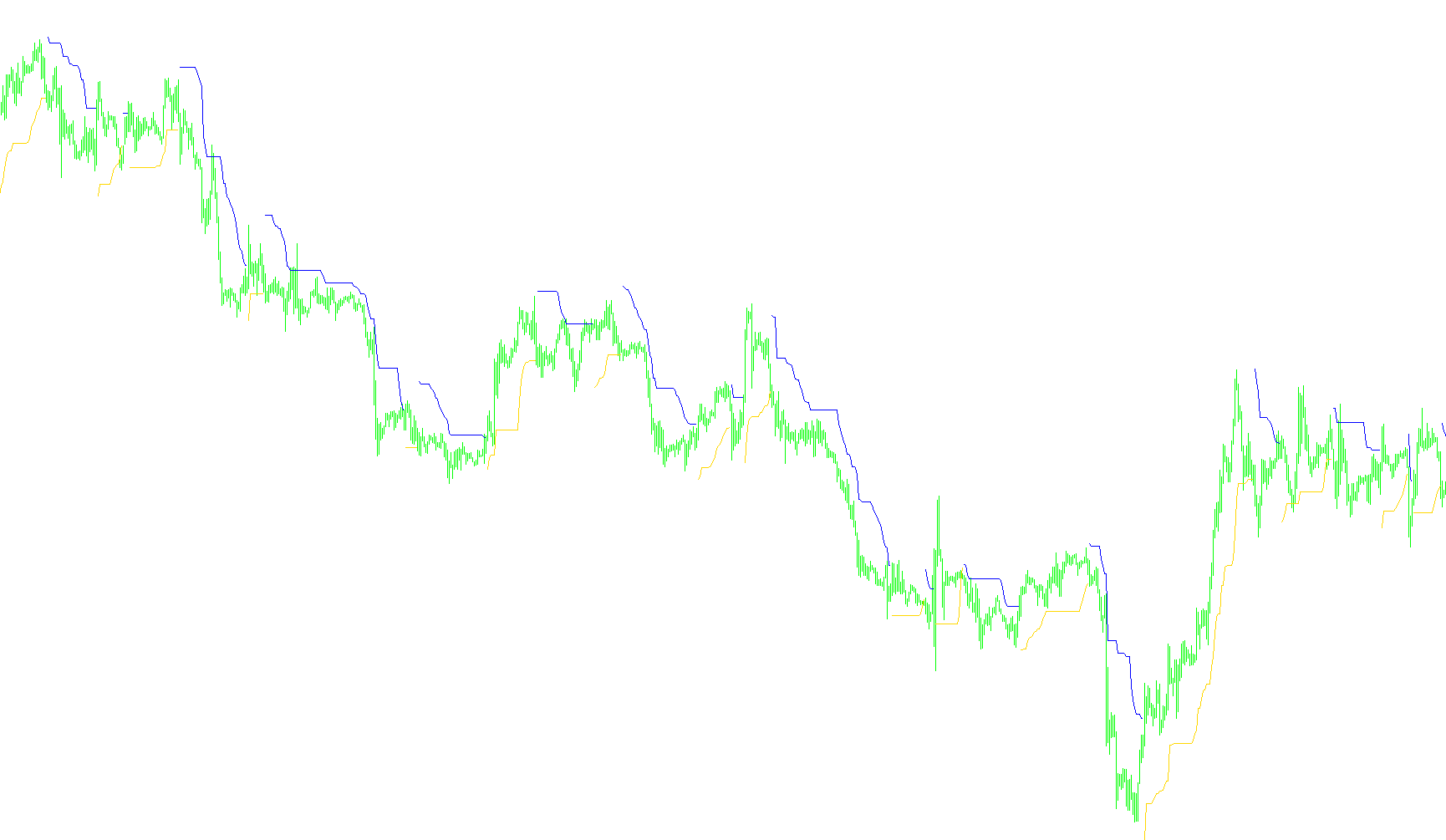
This tool, known as the Chandelier Stop, is designed to help traders identify the current direction of a market trend and establish visual "safety nets" for their positions. Instead of looking at simple price movement, it uses a mathematical approach to determine how much "room" a price has to breathe while still following a clear trend.
Core Logic and Mechanics
The script operates by analyzing three distinct components of market data: the highest highs, the lowest lows, and the prevailing market volatility.
1. Determining Volatility (The Buffer) Rather than using a fixed number of pips or points to set a limit, the tool uses an Average True Range (ATR). This is crucial because it measures how much the price typically moves in a given period. By multiplying this volatility by a specific multiplier (the "Kv" setting), the script creates a dynamic buffer. This ensures that during periods of high market activity, the stop levels widen automatically, and during quiet markets, they tighten.
2. Establishing Trend Boundaries The tool constantly scans the most recent price action over a user-defined period to find the highest peaks and lowest valleys.
- For an Upward Trend: It looks for the highest points reached and subtracts the volatility buffer from that value.
- For a Downward Trend: It looks for the lowest points reached and adds the volatility buffer to that value.
3. Trend Detection and "Ratchet" Logic The script compares the current closing price against these calculated boundaries to decide which way the trend is moving:
- If the price closes above the upper boundary, it signals a bullish (upward) trend.
- If the price closes below the lower boundary, it signals a bearish (downward) trend.
A key feature of this logic is its "ratchet" mechanism. When the market is in an uptrend, the stop level will only move upward as new highs are reached; it will never drop down. Conversely, in a downtrend, the stop level will only move downward as new lows are formed. This ensures that once a trend establishes momentum, the visual "safety line" follows it strictly without being pulled back by minor fluctuations.
Visual Output
The script translates this logic into two distinct lines on your chart:
- The Blue Line (Up): Appears during bullish phases, trailing below the price to show where a trend might be breaking downward.
- The Red Line (Dn): Appears during bearish phases, trailing above the price to show where a trend might be breaking upward.
In summary, this script filters out "market noise" by using volatility-adjusted boundaries, providing a clear visual cue of whether the current market environment is favoring buyers or sellers.
//+------------------------------------------------------------------+
//|                                           ChandelierStops_v1.mq4 |
//|                                  Copyright © 2006, Forex-TSD.com |
//|                         Written by IgorAD,igorad2003@yahoo.co.uk |
//|            http://finance.groups.yahoo.com/group/TrendLaboratory |
//+------------------------------------------------------------------+
#property copyright "Copyright © 2006, Forex-TSD.com "
#property link      "http://www.forex-tsd.com/"

#property indicator_chart_window
#property indicator_buffers 2
#property indicator_color1 Blue
#property indicator_color2 Red


//---- input parameters
extern int     Length=15;
extern int     ATRperiod=14;
extern double  Kv=4;
extern int     Shift=1;
//---- indicator buffers
double UpBuffer1[];
double DnBuffer1[];
double smin[];
double smax[];
double trend[];
//+------------------------------------------------------------------+
//| Custom indicator initialization function                         |
//+------------------------------------------------------------------+
  int init()
  {
   string short_name;
//---- indicator line
   SetIndexStyle(0,DRAW_LINE);
   SetIndexStyle(1,DRAW_LINE);
   IndicatorBuffers(5);
   SetIndexBuffer(0,UpBuffer1);
   SetIndexBuffer(1,DnBuffer1);
   SetIndexBuffer(2,smin);
   SetIndexBuffer(3,smax);
   SetIndexBuffer(4,trend);
//---- name for DataWindow and indicator subwindow label
   short_name="ATRStops("+Length+")";
   IndicatorShortName(short_name);
   SetIndexLabel(0,"Up");
   SetIndexLabel(1,"Dn");
//----
   SetIndexDrawBegin(0,Length);
   SetIndexDrawBegin(1,Length);
//----
   return(0);
  }

//+------------------------------------------------------------------+
//| ChandelierStops_v1                                                     |
//+------------------------------------------------------------------+
int start()
  {

   int shift,limit, counted_bars=IndicatorCounted();

   if ( counted_bars > 0 )  limit=Bars-counted_bars;
   if ( counted_bars < 0 )  return(0);
   if ( counted_bars ==0 )  limit=Bars-Length-1;

	for(shift=limit;shift>=0;shift--)
   {
   smin[shift] = High[Highest(NULL,0,MODE_HIGH,Length,shift+Shift)] - Kv*iATR(NULL,0,ATRperiod,shift+Shift);
	smax[shift] = Low[Lowest(NULL,0,MODE_LOW,Length,shift+Shift)] + Kv*iATR(NULL,0,ATRperiod,shift+Shift);

	  trend[shift]=trend[shift+1];
	  if ( Close[shift] > smax[shift+1] ) trend[shift] =  1;
	  if ( Close[shift] < smin[shift+1] ) trend[shift] = -1;

	  if ( trend[shift] >0 )
	  {
	  if( smin[shift]<smin[shift+1] ) smin[shift]=smin[shift+1];
	  UpBuffer1[shift]=smin[shift];
	  DnBuffer1[shift] = EMPTY_VALUE;
	  }
	  if ( trend[shift] <0 )
	  {
	  if( smax[shift]>smax[shift+1] ) smax[shift]=smax[shift+1];
	  UpBuffer1[shift]=EMPTY_VALUE;
	  DnBuffer1[shift] = smax[shift];
	  }

	}
	return(0);
 }
Comments