TrendEnvelopes_v2_v1
Download script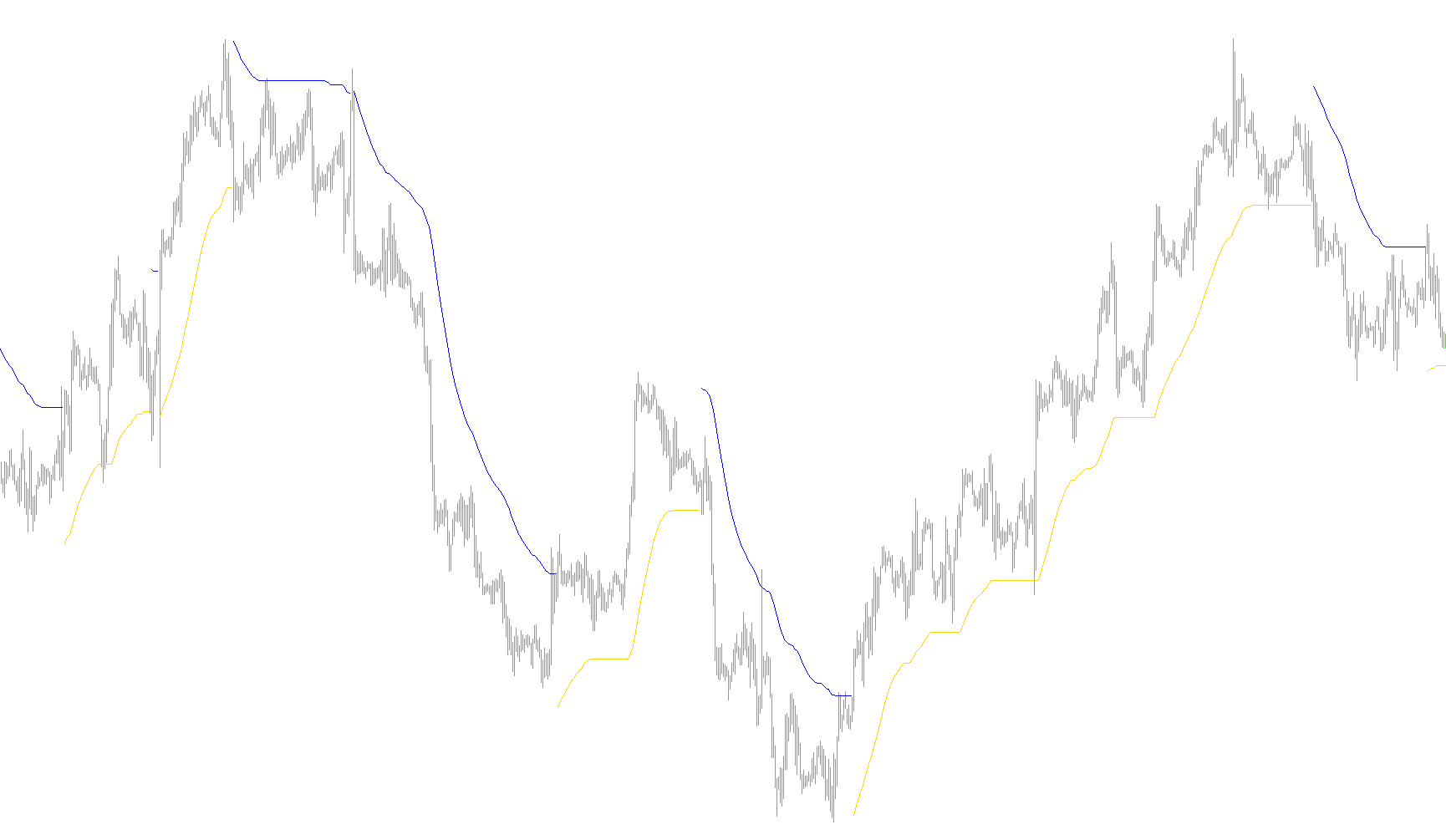
The TrendEnvelopes indicator is designed to help traders visualize market direction and identify potential entry points by creating dynamic boundaries around price action. Instead of just looking at a single moving average, this tool creates a "buffer zone" that adapts to the current trend, helping to filter out market noise.
Core Logic and Functionality
The script operates based on three primary components: Trend Detection, Envelope Creation, and Signal Generation.
1. Dynamic Trend Detection The foundation of the indicator is a Moving Average (MA), which smooths out price fluctuations. The script constantly monitors whether the current market price is breaking above or below specific "outer limits" calculated from this moving average.
- If the price closes above the upper boundary, the script identifies an Uptrend.
- If the price closes below the lower boundary, the script identifies a Downtrend.
2. The Envelope System Once a trend is identified, the indicator plots visual "envelopes" (lines) on your chart:
- In an Uptrend: The script tracks the lowest point of the lower boundary. It creates a floor for the price movement, visually representing the support level of the current bullish move.
- In a Downtrend: The script tracks the highest point of the upper boundary. It creates a ceiling for the price movement, representing the resistance level of the current bearish move.
Unlike standard indicators that may swing wildly, these envelopes "lock" onto their respective levels to provide a clearer picture of where the trend is holding firm.
3. Signal Alerts The tool includes an optional signaling feature. When the market switches from one trend state to another (e.g., moving from a confirmed downtrend directly into an uptrend), the indicator can plot specific visual markers (arrows) on the chart. These marks appear at a calculated distance from the price, highlighting the moment of momentum shift to help traders react more quickly to new price directions.
Summary for Traders
This script essentially acts as a "smart" trend filter. It ignores minor price fluctuations and only reacts when price action confirms a structural change in direction. By providing both a visual boundary (the envelope) and specific entry markers, it allows you to see not just where the price is going, but also the boundaries within which the current trend is expected to operate.
/*-----------------------------+
|			       |
| Shared by www.Aptrafx.com    |
|			       |
+------------------------------*/

//+------------------------------------------------------------------+
//|                                            TrendEnvelopes_v1.mq4 |
//|                           Copyright © 2006, TrendLaboratory Ltd. |
//|            http://finance.groups.yahoo.com/group/TrendLaboratory |
//|                                   E-mail: igorad2003@yahoo.co.uk |
//+------------------------------------------------------------------+
#property copyright "Copyright © 2006, TrendLaboratory Ltd."
#property link      "http://finance.groups.yahoo.com/group/TrendLaboratory"
//---- indicator settings
#property indicator_chart_window
#property indicator_buffers 4
#property indicator_color1 LightBlue
#property indicator_color2 Orange
#property indicator_width1 2
#property indicator_width2 2
#property indicator_color3 LightBlue
#property indicator_color4 Orange
#property indicator_width3 2
#property indicator_width4 2
//---- indicator parameters
extern int     MA_Period      = 34;
 int     MA_Shift       =  0;
 int     MA_Method      =  3;
 int     Applied_Price  =  0;
 double  Deviation      =0.2;
 int     UseSignal      =  0;
//---- indicator buffers
double UpBuffer[];
double DnBuffer[];
double UpSignal[];
double DnSignal[];
double smax[];
double smin[];
double trend[];

//----
int ExtCountedBars=0;
//+------------------------------------------------------------------+
//| Custom indicator initialization function                         |
//+------------------------------------------------------------------+
int init()
  {
   int    draw_begin;
   string short_name;
//---- drawing settings
   IndicatorBuffers(7);
   SetIndexStyle(0,DRAW_LINE);
   SetIndexShift(0,MA_Shift);
   SetIndexStyle(1,DRAW_LINE);
   SetIndexShift(1,MA_Shift);

   SetIndexStyle(2,DRAW_ARROW);
   SetIndexShift(2,MA_Shift);
   SetIndexArrow(2,233);
   SetIndexStyle(3,DRAW_ARROW);
   SetIndexShift(3,MA_Shift);
   SetIndexArrow(3,234);

   IndicatorDigits(MarketInfo(Symbol(),MODE_DIGITS));
   if(MA_Period<2) MA_Period=14;
   draw_begin=MA_Period-1;
//---- indicator short name
   IndicatorShortName("Env("+MA_Period+")");
   SetIndexLabel(0,"UpTrendEnv");
   SetIndexLabel(1,"DnTrendEnv");
   SetIndexLabel(2,"UpSignal");
   SetIndexLabel(3,"DnSignal");
   SetIndexDrawBegin(0,draw_begin);
   SetIndexDrawBegin(1,draw_begin);
   SetIndexDrawBegin(2,draw_begin);
   SetIndexDrawBegin(3,draw_begin);
   //---- indicator buffers mapping
   SetIndexBuffer(0,UpBuffer);
   SetIndexBuffer(1,DnBuffer);
   SetIndexBuffer(2,UpSignal);
   SetIndexBuffer(3,DnSignal);
   SetIndexBuffer(4,smax);
   SetIndexBuffer(5,smin);
   SetIndexBuffer(6,trend);
   if(Deviation<0.1) Deviation=0.1;
   if(Deviation>100.0) Deviation=100.0;
//---- initialization done
   return(0);
  }
//+------------------------------------------------------------------+
//| Custom indicator iteration function                              |
//+------------------------------------------------------------------+
int start()
  {
   int limit;
   if(Bars<=MA_Period) return(0);
   ExtCountedBars=IndicatorCounted();
//---- check for possible errors
   if (ExtCountedBars<0) return(-1);
//---- last counted bar will be recounted
   if (ExtCountedBars>0) ExtCountedBars--;
   limit=Bars-ExtCountedBars;
//---- EnvelopesM counted in the buffers
   for(int i=limit; i>=0; i--)
     {
      smax[i] = (1+Deviation/100)*iMA(NULL,0,MA_Period,0,MA_Method,Applied_Price,i);
      smin[i] = (1-Deviation/100)*iMA(NULL,0,MA_Period,0,MA_Method,Applied_Price,i);

      trend[i]=trend[i+1];

	   if (Close[i]>smax[i+1])  trend[i]=1;
	   if (Close[i]<smin[i+1])  trend[i]=-1;

	   if(trend[i]>0)
	   {
	   if (smin[i]<smin[i+1]) smin[i]=smin[i+1];
	   UpBuffer[i]=smin[i];
	   if (UseSignal>0)
	   if (trend[i+1]<0) UpSignal[i] = Low[i]-0.5*iATR(NULL,0,MA_Period,i);
	   DnBuffer[i]=EMPTY_VALUE;
	   }
	   else
	   {
	   if(smax[i]>smax[i+1]) smax[i]=smax[i+1];
	   DnBuffer[i]=smax[i];
	   if (UseSignal>0)
	   if (trend[i+1]>0) DnSignal[i] = High[i]+0.5*iATR(NULL,0,MA_Period,i);
	   UpBuffer[i]=EMPTY_VALUE;
	   }
   }
//---- done
   return(0);
  }
//+------------------------------------------------------------------+
Comments